Publish generations to Flow Production Tracking.
SG Publish creates a Version with the model, prompt, seed, sampler and workflow that made it.
A generation is a file with nothing attached.
The checkpoint, the prompt, the seed and the sampler are in a graph on one machine. The file that leaves it has a name and a date.
In the output directory
- A file name.
- A size and a date.
- Whatever the artist typed into the name.
On the SG Version
- Nine typed fields, queryable in a filter or a page layout.
- The workflow, attached, when the submitting client sent one.
- A
.provenance.jsonrecord. - Review media that plays in a browser.
SG Publish creates the Version and uploads the media.
Pick the project and the link on the node. The pickers read them from your site.
Linked the way your site links
A Shot, an Asset, or whatever else this project's Versions already use.
Named by a template
Root name and version name come from the profile. Settings writes both.
Files registered on request
Frames or the movie become PublishedFiles when Create Published Files is ticked.
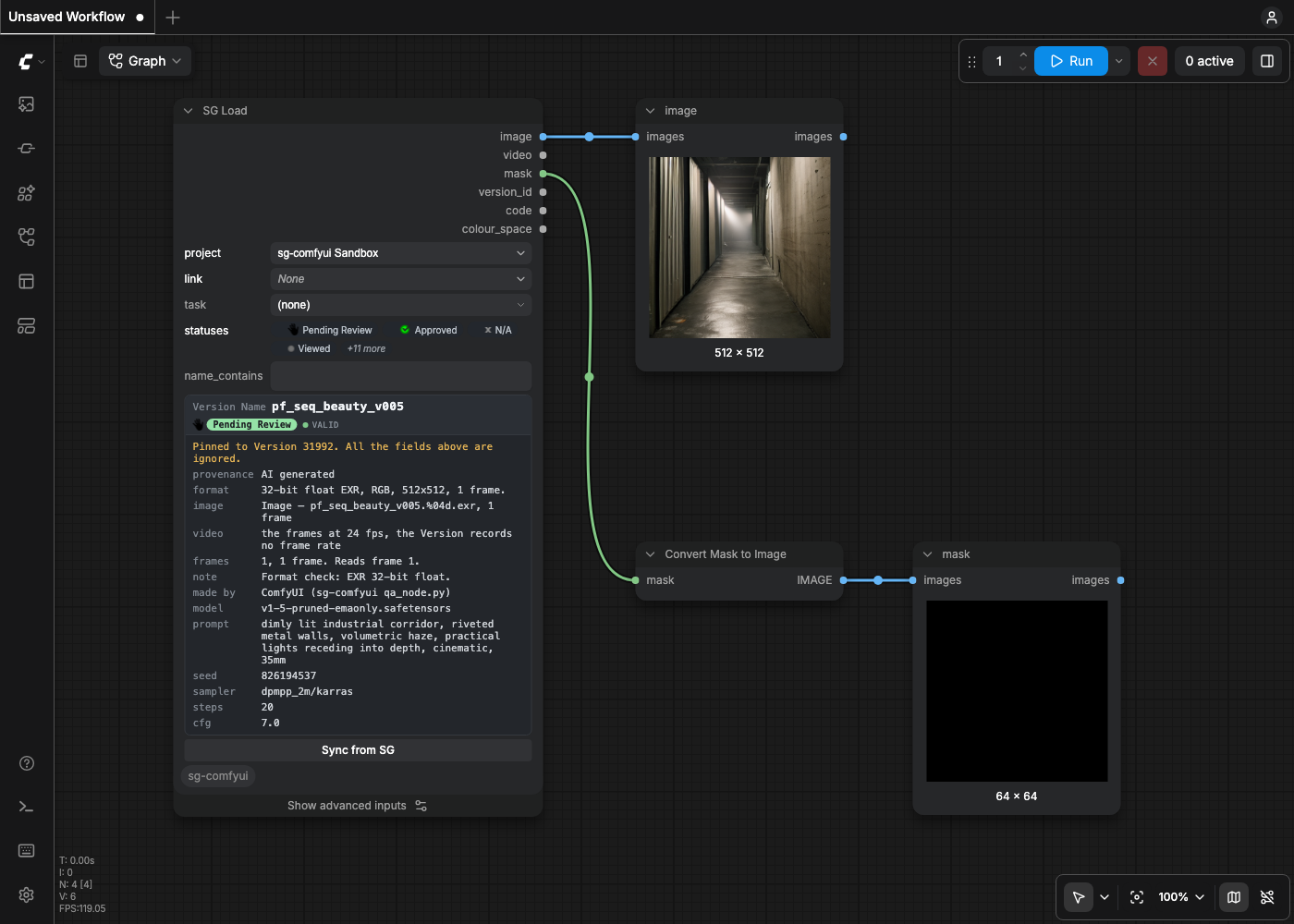
SG Load reads the media back into the graph.
Find a Version by project, link, Task, status and name. pin_version_id takes an id
instead. 16-bit PNG and EXR are read at full precision.
- Outputs
imagevideomaskversion_idcodecolour_space- Recorded downstream
- The Version it read, on anything published from the same graph.
Provenance
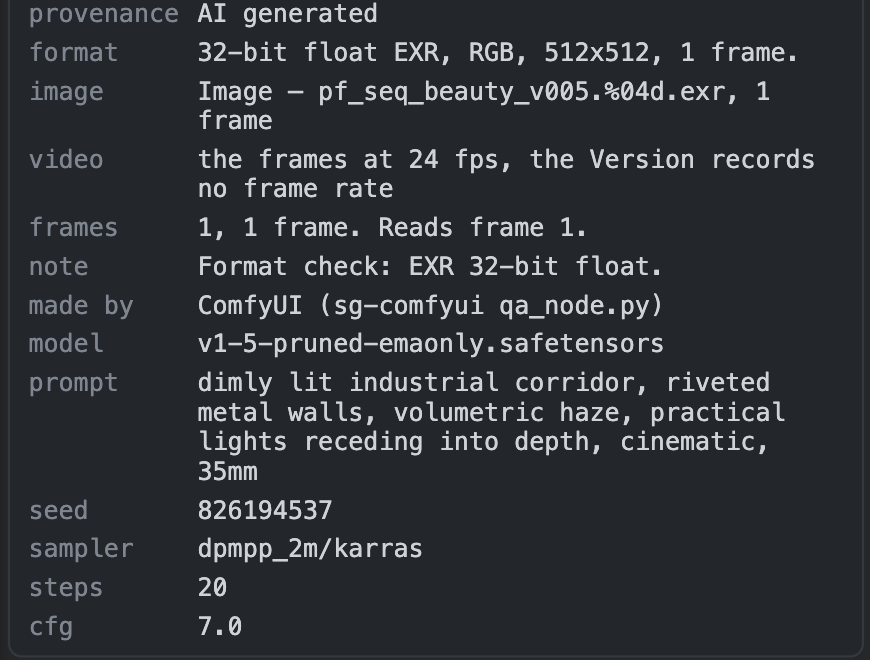
AI provenance is recorded in Version fields: sg_ai_generator, sg_ai_model, sg_ai_prompt, and so on. A site without them gets the
same facts in the Version's description.
SG Publish shows what it will record. SG Load shows what a Version records. An agent can help you set the fields up, or map them to existing fields you already have.
- AI Generator
sg_ai_generatorComfyUI, and the name the submitting client gave itself - AI Model
sg_ai_modelthe checkpoints the graph loaded - AI Prompt
sg_ai_promptpositive conditioning on this branch - AI Negative Prompt
sg_ai_negative_promptnegative conditioning on this branch - AI Seed
sg_ai_seedtext, not a number: seeds reach 2**64-1 - AI Sampler
sg_ai_samplersampler and scheduler - AI Steps
sg_ai_stepsthe last sampler on the branch - AI CFG
sg_ai_cfgthe last sampler on the branch - AI Generated From
sg_ai_generated_fromthe Versions this was made from
Three frame formats, written by ComfyUI's encoder.
Pick one on the node's format widget. A VIDEO read from a file is uploaded as that file, byte for byte.
8-bit PNG
The plain case. Review media is 8-bit whatever the frames are.
16-bit PNG
SG Load reads it back at full precision.
EXR 32-bit float
Pixels are written unchanged. The declared colour space goes in the PublishedFile's description and is never applied.
Three demo templates to test the nodes.
Open the Templates browser, category sg-comfyui. 00_example publishes one image and reads it back. For a graph you already use, /track-workflow adds the nodes to it.
00_example Open the full graph01_concept_and_style Open the full graph02_style_from_a_reference Open the full graphFiles are copied to the storage location.
The nodes use only the filesystem roots defined on your SG site (Local File Storage) and relative path templates similar to SG Toolkit's.
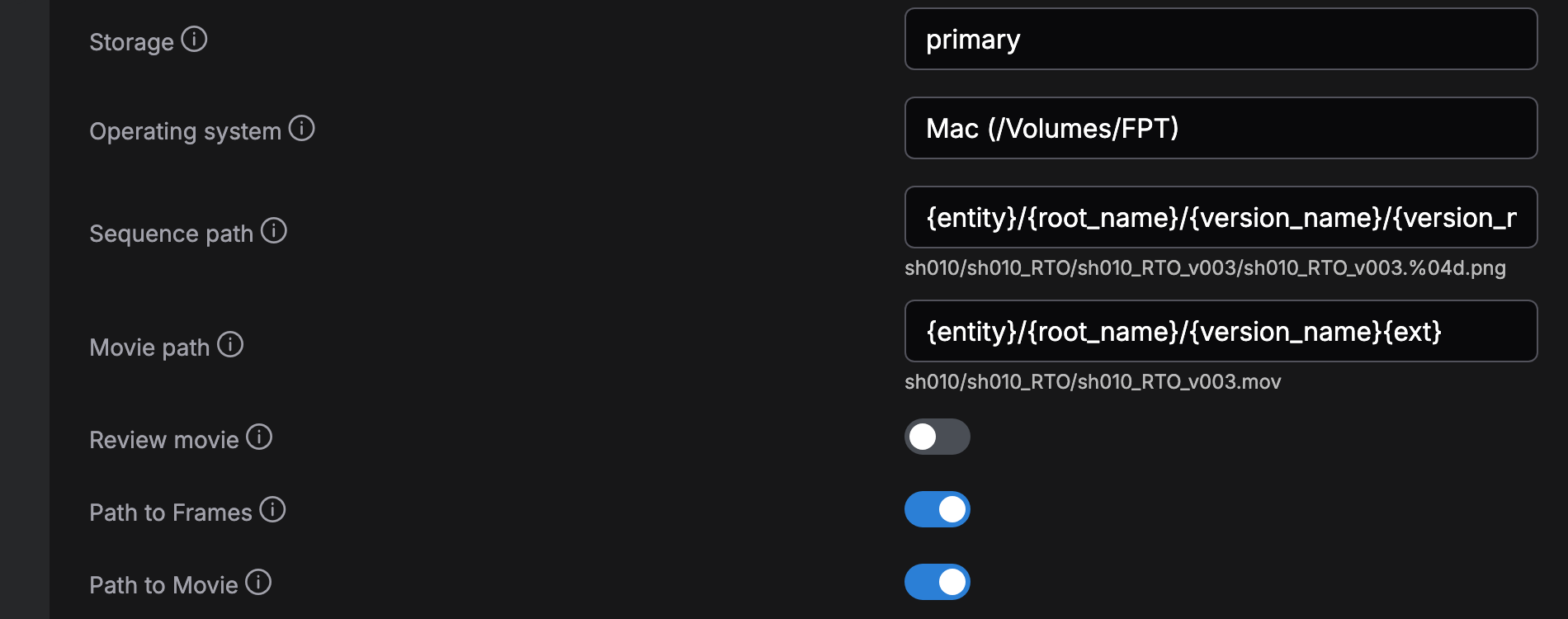
{entity}/{root_name}/{version_name}/{version_name}.%04d{ext}

/Volumes/FPT/sh010/verify_pub_rows/verify_pub_rows_v003/verify_pub_rows_v003.%04d.exr
ComfyUI writes the frames to its own output directory and the node copies them under the root. A publish that fails after the copy names the copies it left. A re-run overwrites the same paths.
A PublishedFile path is stored against the storage root, so the site resolves it on every operating system the root is mapped for. Path to Frames and Path to Movie are optional Version fields, one string each, written in the notation of the operating system picked under Settings, then SG.
| token | what it is |
|---|---|
{version} | the publish revision |
%04d #### @@@@ | the frame number |
{entity.Shot.code} | a dotted field path, to any depth |
[optional blocks] | dropped when the fields inside are empty |
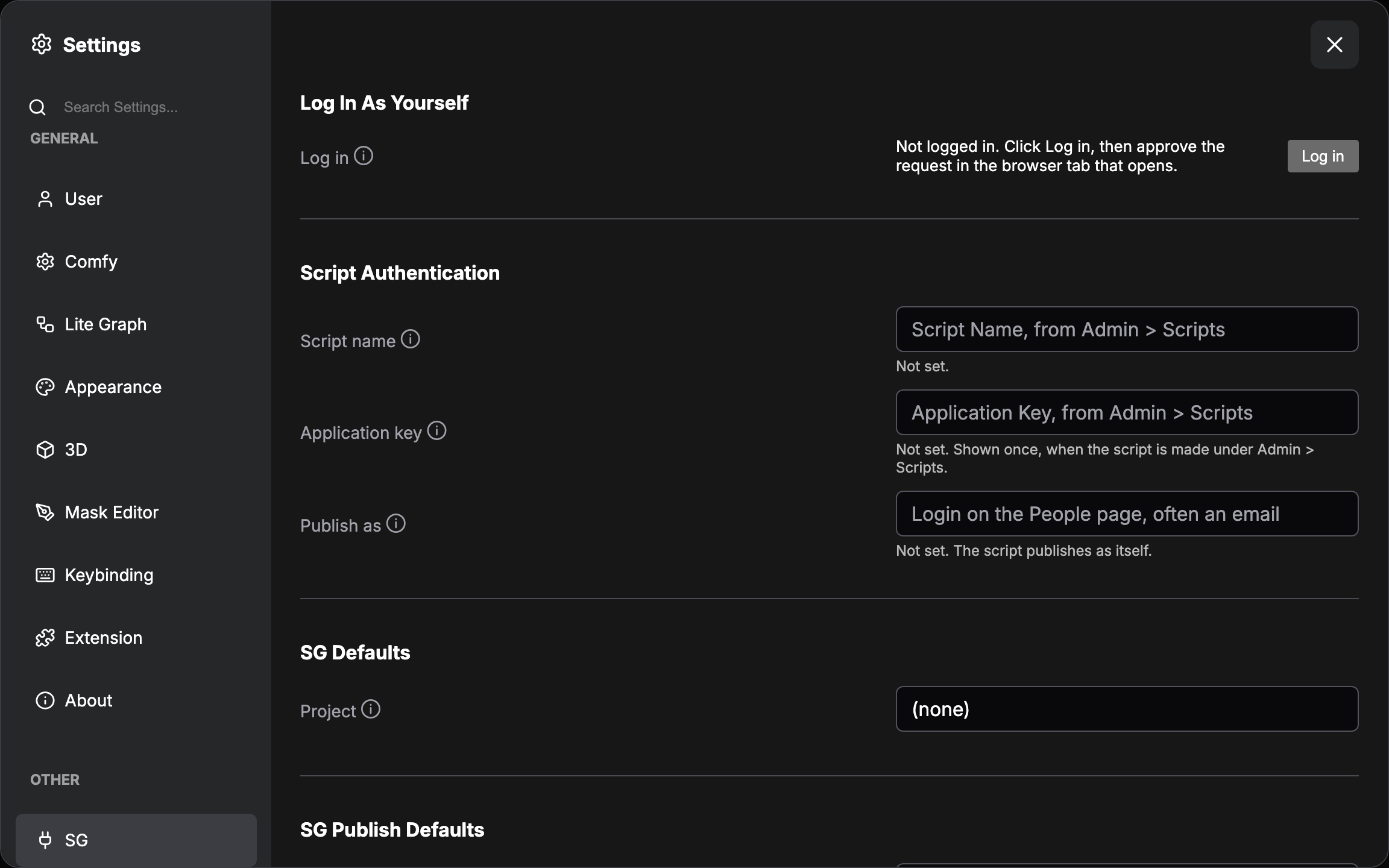
Sign in as yourself, or as a script.
A person, at a workstation
Press Log in under Log In As Yourself. Approve the request in the browser tab. The nodes publish as you.
A script, on a farm
Make the script under Admin, then Scripts. Enter its Script name and Application key under Script Authentication.
Press Test either way. It reports who the nodes publish as. Both are stored in ComfyUI's protected user directory, never in the settings store.
Install
| requirement | value |
|---|---|
| ComfyUI | 0.34.0 or newer |
| Python | 3.11 |
| Site | a Flow Production Tracking site you can log into |
From the Registry, comfy node install sg-comfyui or ComfyUI Manager: the pack as
released. From the repo, a clone into custom_nodes: the pack you customize with an
agent. Check which one you should install in the docs.
The prompts
Install the sg-comfyui node pack from the Comfy Registry into my ComfyUI:
`comfy node install sg-comfyui` with the Comfy CLI, or ComfyUI Manager.
Install its requirements.txt into the interpreter ComfyUI runs on.
Restart ComfyUI.
Welcome me.
Then offer to run /setup from ComfyUI/custom_nodes/sg-comfyui.
Clone https://github.com/ksallee/sg-comfyui into ComfyUI's custom_nodes directory.
Install its requirements.txt into the interpreter ComfyUI runs on.
Restart ComfyUI.
Welcome me.
Ask me before you run tools/doctor.py.
Then offer to run /setup.First run
- Open Settings, then SG.
- Enter your site address under Connection.
- Press Log in, then approve the request in the browser tab.
- Press Test.
- Pick the project under SG Defaults.
- Open the Templates browser, category sg-comfyui, and open
00_example. - Pick a link on each node.
- Press Run.
Restart ComfyUI to install or upgrade the pack. A profile edit is read on a browser refresh.
tools/doctor.py checks the install offline.
It prints one line per thing a publish needs, with the fix appended where it fails, and
exits non-zero on anything that would stop a publish. --site adds the
connection, the provenance fields, the storage roots and the link types.
It needs no site, no ComfyUI and no torch. Run it with the interpreter ComfyUI runs on: when two interpreters differ, it names both.
ok    Python 3.11.11 at /Users/you/ComfyUI/venv/bin/python.
ok    sg_groundtruth imports here.
ok    requests imports here.
ok    Pillow imports here.
ok    This is the interpreter ComfyUI runs on, /Users/you/ComfyUI/venv/bin/python.
An agent adds the nodes to your workflow.
Point your agent at a graph you already use. /track-workflow adds SG Publish and
SG Load where the graph needs them, wired and filled in, and leaves the original untouched. /setup connects the site and creates the provenance fields. AGENTS.md is the entry point, written for any harness. An agent runs tools/doctor.py first.
/setup /inspect-site /track-workflow /task The agent page
What this pack does not do.
No encoder, no decoder, no generation. ComfyUI writes and reads the pixels.
No charts, no dashboards, no scheduled reports, no automations.
Review media is derived and may be transcoded. A deliverable file is never transformed.
Colour space is recorded, never applied. Core ComfyUI has no colour management.
What's next
The order is not decided. Open an issue for the one you need, whether or not it is on this list.
- Registering files another node wrote, such as Save Image (Advanced) or an OCIO Write.
- Publishing where there is no shared storage, by uploading a zip.
- Publishing on someone's behalf, and naming the artist on a farm.
- Newest per stream, rather than newest on the link.
- Version fields and linked fields as inputs on SG Publish: a field search in Settings, a re-orderable list, each field a normal or advanced input.
- A colour-managed template.
- Publishing from a Windows machine is untested. You can contribute.
The pack is alpha, and it is built for you to contribute back!
Adjust the nodes for your pipeline, or send the change back. Tell Kevin what breaks and what is missing.